Quick-Check Hub
Grow a Garden 2 Hub: Wiki, Codes, Stock, Routes
A Roblox farming hub for the wiki resource, active-watch code, seed stock, sheckles, guild rewards, night stealing, pets, values, and offline growth checks.
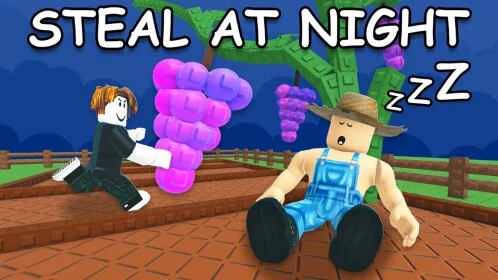
Start Grow a Garden 2 by confirming the current Roblox game, trying the active-watch code, reading the seed stock, planning sheckles around guild and offline goals, then opening the wiki resource for fast crop, pet, stock, calculator, and value lookups.
Version focusCurrent Roblox release - June 2026
Current statusGood for June 2026 planning around codes, seed restocks, sheckles, guild rewards, night stealing, and offline growth. Confirm rewards, prices, stock, pet abilities, and values in the live Roblox UI before spending rare items.
Grow a Garden 2 is a Roblox farming and tycoon-style follow-up where the important decision is not only what to plant. The current game loop points players toward seed restocks, planting, harvesting for sheckles, guild rewards, night stealing, and a garden that keeps growing while you are offline. That mix makes the first few checks matter: test the current code, choose seeds carefully, protect anything valuable before night, and avoid spending sheckles until you know what the next restock or guild goal needs.
For quick reference, open the Grow a Garden 2 wiki resource when you want a dedicated page for codes, stock, calculator-style checks, crops, pets, mutations, values, gear, and route notes. Keep this New Web Play hub for the safer question that comes before the lookup: what should you check first, what should you verify in the live game, and what should you avoid doing in a hurry?
Best First Checks
If you are opening Grow a Garden 2 for the first time, do not start by chasing the rarest crop or the loudest value claim. Start with the systems that can change your next ten minutes.
| Step | Check | Why it matters |
|---|---|---|
| 1 | Current game page and title | Roblox search can surface similar names, so make sure the place name and creator match the current Grow a Garden 2 result before you invest time. |
| 2 | Code box | Try TEAMGREENBEAN first. If the code fails, treat it as expired until a live reward appears. |
| 3 | Seed stock | Seeds are the first gate. A weak buy can slow the whole session, while a good restock can set up sheckles for the next route. |
| 4 | Sheckles plan | Decide whether this session is for quick cash, a larger crop route, guild progress, pet testing, or safer offline growth. |
| 5 | Night risk | If stealing is active at night, do not treat every plot like safe storage. Protect or sell anything you cannot afford to lose. |
| 6 | Wiki lookup | Use the wiki resource when you need a fast code, stock, crop, pet, mutation, value, or calculator check, then confirm the exact result in the game UI. |
This route keeps you from overcommitting early. Grow a Garden 2 rewards players who read the current shop and protect value before stepping away, not players who spend everything on a single rumor.
Codes And Redeem Check
The safest way to use Grow a Garden 2 codes is to treat them as a pre-session check, not as the whole plan. Try the current code before you buy seeds, then move on to stock and sheckles even if the code box is empty.
| Code to try | Reward to expect | Status | What to do |
|---|---|---|---|
TEAMGREENBEAN | 3 Green Bean Seeds | Active-watch | Open the settings menu, paste the code into the code box, claim it once, then check your inventory before planning around the reward. |
If the code returns invalid, do not keep rebuilding your route around it. Check capitalization, remove extra spaces, and then treat it as expired until the game accepts it. Roblox codes can rotate quickly, and a seed reward only matters if it actually lands in your current inventory.
Stock, Seeds, And Sheckles
Grow a Garden 2 search interest is going to cluster around stock, seeds, values, and money because those are the decisions that cost time. Use the live shop as the final answer, but use this route to avoid the common early mistakes.
| Problem | Good move | Avoid this |
|---|---|---|
| You joined right before a seed refresh | Wait long enough to read the visible stock before spending your full balance | Buying filler seeds just because the shop is open |
| You have a small sheckles balance | Buy seeds that lead to the next clear purchase or guild contribution | Spending everything before checking the next restock or reward target |
| You found a valuable crop | Check value, event state, and night risk before selling or leaving it exposed | Quick-selling rare output because the normal crop price looks fine |
| You are saving for pets or gear | Keep the next purchase goal separate from your planting budget | Using pet or gear money on uncertain seed rolls |
| You are about to log off | Plant a route that is still useful when you return | Leaving the best crop exposed only because offline growth continues |
Think of sheckles as route fuel. A good session usually spends enough to keep the garden growing, but not so much that the next stock refresh, pet offer, or guild target becomes unreachable.
Confirmed Loop vs Live Checks
Some parts of Grow a Garden 2 are stable enough to plan around because they are part of the public game description. Other parts can move quickly with updates, events, and player reports.
| What to plan around | How to use it |
|---|---|
| Seed restocks | Check the shop before planting a long route. If a better seed is about to become available, avoid spending all sheckles on filler. |
| Plant, harvest, sell | Treat every crop as part of a cash route. Ask whether it helps the next purchase, guild goal, or offline setup. |
| Sheckles | Keep enough currency for the next restock or defense need instead of emptying your balance on one uncertain buy. |
| Guild weekly rewards | Join or create a guild when you are ready to contribute consistently, not just because the reward label looks strong. |
| Night stealing | Move or protect valuable crops before night pressure matters. If a crop is rare, do not leave it exposed while testing menus. |
| Offline growth | Before logging off, plant a route that makes sense when you return. Do not leave your best value sitting unprotected just because growth continues. |
Exact code status, shop contents, crop prices, pet details, event rewards, and value claims should be treated as live checks. A page can get you to the right question faster, but the game UI is where you confirm the answer before spending.
Night Stealing Checklist
Night stealing changes how you should think about your plots. A crop is not only a future sale; it can also become risk sitting in the open.
| Before night | Why it helps |
|---|---|
| Harvest or protect anything you would hate to lose | Rare output is usually worth slowing down for. |
| Keep one sample if you are unsure about value | A single saved sample gives you time to check values without panic-selling everything. |
| Sell replaceable crops before testing menus | Common harvests can become quick sheckles instead of clutter. |
| Check whether guild progress needs the crop | Guild rewards can make a crop useful even if the sale price is not exciting. |
| Do not walk away from an exposed high-value plot | Offline growth is useful, but it does not make careless storage safe. |
If you are playing in a public server, be more conservative. If you are still learning how night pressure works in the current build, use cheaper crops for tests and save the expensive route for a session where you can watch the garden.
Guild And Weekly Rewards
Guilds matter because Grow a Garden 2 frames weekly rewards as a core goal. The mistake is joining a guild and then spending your session in a way that does not help the weekly target.
| Your situation | Best next action |
|---|---|
| You are new | Learn the seed and sheckles loop first so you can contribute instead of only asking for help. |
| You joined a guild today | Read the current weekly target before planting a long route. |
| The reward looks strong | Check what the guild actually needs, then decide whether this session should chase money, crops, or protection. |
| Your garden is low value | Build reliable sheckles before trying to carry weekly progress. |
| You can only play briefly | Do one clean stock-code-harvest cycle instead of starting a risky long route you cannot monitor. |
Guild rewards are best treated as a weekly plan, not a last-minute panic. If a target requires crops or resources you cannot protect yet, build the economy first.
Pets, Mutations, And Values
Pets, mutations, and high-value crops are where players are most likely to search before spending. The safe rule is simple: look up the item, then verify the exact label and effect in Roblox before selling, trading, or buying.
| Search problem | Use this habit |
|---|---|
| Best pets | Compare the pet’s actual ability, rarity, cost, and current demand instead of buying only because the name looks rare. |
| Pet values | Treat value rows as a range, then check whether the pet is limited, event-tied, or still easy to obtain. |
| Mutations | Hold a special crop long enough to confirm whether the mutation changes sale value, guild usefulness, or trade demand. |
| Calculator checks | Use calculator-style pages for a fast estimate, then read the live sell preview before accepting the result. |
| Gear choices | Buy gear only when it supports your current route: faster sheckles, safer crops, better offline setup, or guild progress. |
When in doubt, keep rare results until you can compare them. Selling too slowly costs a little time; selling the wrong rare crop or pet can cost the whole session.
What To Open The Wiki Resource For
The wiki resource is most useful when you need a lookup, not a long explanation. Use it when your next move depends on a fast answer.
| Player situation | Open the resource for | Then do this in-game |
|---|---|---|
| You just joined after an update | Codes and stock checks | Test codes directly and read the shop before spending. |
| You see a crop or pet name you do not know | Crop, pet, or value lookup | Compare the live item label, rarity, and any current event effects. |
| You are about to sell | Calculator or value checks | Confirm the sale preview and avoid selling rare results too quickly. |
| You plan to leave the game running or log off | Offline growth and defense route | Protect valuable plots before night risk or offline timing catches you. |
| Your guild is chasing rewards | Guild and weekly route notes | Check the current weekly target before committing your whole session. |
The safest habit is to use the resource as a shortcut, then make the final call inside Roblox. That keeps you from planning around an expired code, stale stock row, or value note that changed after an update.
First Session Priorities
Early progress should build a repeatable route. A flashy crop matters less than a garden that can keep producing sheckles without forcing risky sells.
| Priority | Good early move | Risky early move |
|---|---|---|
| Currency | Buy seeds that support the next upgrade or restock cycle | Spend all sheckles before checking the shop timer |
| Safety | Keep valuable harvests protected before night | Leave rare crops exposed while testing other menus |
| Guilds | Join when you understand the weekly reward route | Commit time before knowing what the guild needs |
| Offline growth | Plant something you can return to safely | Log off with your best crop exposed or unplanned |
| Lookups | Check the wiki resource for fast references | Treat any outside value as final without checking the game UI |
If a choice feels unclear, keep one sample, sell replaceable extras, and avoid spending rare resources until the current build confirms the payoff.
Common Search Problems
Use this table when you land here with one specific Grow a Garden 2 question and do not want to read the whole page.
| Search query | Short answer |
|---|---|
| Grow a Garden 2 codes | Try TEAMGREENBEAN first, then check the live code box before planning around the reward. |
| Grow a Garden 2 stock | Read the visible seed stock and restock state before buying; stock is the purchase gate. |
| Grow a Garden 2 calculator | Use calculator pages for estimates, but confirm the live sell preview before selling a rare result. |
| Grow a Garden 2 values | Treat value lookups as decision support, then compare the exact crop, pet, rarity, and event state in-game. |
| Grow a Garden 2 pets | Check ability and availability before buying; a rare name is not always the best route for your current sheckles. |
| Grow a Garden 2 guild | Check the weekly target first, then plant around that target instead of chasing random crops. |
| Grow a Garden 2 offline growth | Plant a route that will still be safe and useful when you return, and do not leave top value exposed. |
| Grow a Garden 2 night stealing | Harvest, protect, or sell valuable crops before night pressure turns your garden into risk. |
Grow a Garden 2 vs Grow a Garden
Players coming from the first Grow a Garden should not assume every habit carries over cleanly. The original game has a deeper New Web Play tool set for codes, stock, values, WFL, mutations, pets, and crop math. Grow a Garden 2 is newer, so the safer page is a hub that helps you route the session without pretending every exact value is settled.
| Question | Grow a Garden | Grow a Garden 2 |
|---|---|---|
| Main New Web Play page | Grow a Garden hub | This Grow a Garden 2 hub |
| Best use | Daily tools, trade checks, values, pets, mutations, and calculators | Current game confirmation, wiki-resource route, code test, seed stock planning, night safety, and offline growth habits |
| Biggest caution | Trade values and event demand can move quickly | Exact codes, stock, prices, rewards, pet details, and defense behavior need live confirmation |
If you meant the first game, open the Grow a Garden hub instead. If you are playing the sequel, keep this page focused on session safety and use the wiki resource for fast lookup pages.
Before You Spend Sheckles
Use this short check before buying seeds, selling a valuable harvest, or leaving your garden alone:
- Is the current seed restock better than what I am about to buy?
- Does this crop help quick sheckles, guild progress, pet planning, or offline growth?
- Could night stealing make this plot unsafe?
- Do I need to protect, harvest, or sell before stepping away?
- Did I confirm the exact code, stock, pet value, crop value, or reward in the live game?
The answer does not need to be perfect. It just needs to stop the biggest mistakes: spending before reading the shop, selling before checking value, and logging off before protecting the garden.
Session Route Examples
| Session length | Route |
|---|---|
| 5 minutes | Test the code, check seed stock, harvest ready crops, sell replaceable crops, and protect anything valuable before leaving. |
| 15 minutes | Run one stock-to-harvest loop, keep sheckles for the next restock, and check whether a guild task changes what you should plant. |
| 30 minutes | Add a value or calculator check before selling rare crops, then decide whether pets, gear, or seeds deserve the next sheckles spend. |
| Longer session | Track night risk, guild progress, pet goals, and offline setup together. Long sessions are best when every harvest supports the next route. |
Next Pages To Open
FAQ
Where should I start in Grow a Garden 2?
Start by confirming you are in the current Grow a Garden 2 Roblox experience, then test the current code, check seed stock, plan sheckles, and protect valuable crops before night or offline growth.
Are there Grow a Garden 2 codes?
At last check, TEAMGREENBEAN was the code to try first for Green Bean Seed rewards. If it fails, check spelling and then treat it as expired until the live code box accepts a new reward.
What makes Grow a Garden 2 different from the first game?
The listed loop emphasizes seed restocks, sheckles, guild weekly rewards, night stealing, and offline growth. That means defense and return timing matter more before you step away.
What should I use the Grow a Garden 2 wiki resource for?
Use the wiki resource for fast lookups around codes, stock, crops, pets, mutations, values, calculator checks, and route notes, then confirm the final number or reward in-game.
Should I trust exact prices, pet values, and stock from any page?
Use outside pages as shortcuts, but confirm exact code status, shop stock, crop value, pet details, and reward timing inside the current game before making a big decision.
What should I check before logging off?
Plant a route you can afford to lose, protect valuable crops before night pressure, spend only where the next upgrade is clear, and remember that offline growth can change what is ready when you return.