Official Play Route
Meccha Chameleon Game: Where to Play and What to Know
The official Meccha Chameleon game is the Steam PC version. GeForce NOW is a cloud option, but there is no confirmed official free browser, Roblox, or native mobile version.
Version Check
Use this before trusting an online, Roblox, mobile, or free result.
Meccha Chameleon has one clean official route for most players: Steam on PC. The checks below help you spot which results are official, which are cloud play, and which are likely separate copies.
This is the route to use when you want the real release, current price, Steam reviews, and a normal install.
Best moveOpen Steam before buying or installing.
Cloud play can stream the Steam game on supported accounts and devices, but it is not a separate browser build.
Best moveUse it if your device cannot run the PC version.
A play-online page may be a search page, fan page, mirror, or separate clone unless it proves an official link.
Best moveDo not install unknown launchers or APKs.
Roblox hide-and-seek versions may fit the same mood, but they are not confirmed as the Steam release.
Best moveTreat Roblox results as alternatives.
Same-name iOS or Android listings should be checked carefully because they may not come from the Steam developer.
Best moveLook for a clear developer connection.
The real Steam game is paid, while free results usually mean a sale claim, cloud session, clone, or similar game.
Best moveCheck your Steam region and sale status.
Search Resolver
Match the search term to the route.
meccha chameleon gameYou probably want the official route first: Steam, then cloud notes if you cannot install it.
meccha chameleon onlineSeparate cloud streaming from random browser play pages before clicking through.
meccha chameleon robloxExpect inspired hide-and-seek games unless the page clearly proves official ownership.
meccha chameleon cloneDecide whether you mean a copy on another platform or the clone mechanic inside the game.
how to play meccha chameleonStart with the paint, hide, pose, and seek loop before looking for advanced tricks.
The safest way to play Meccha Chameleon is the official Steam PC release. If you came here because you want to play the game, start with Steam, then use the status checks above before trusting a browser, Roblox, mobile, clone, or free-play result. The important split is simple: Steam is the official store route, GeForce NOW is cloud streaming support, and everything else needs careful checking before you treat it as the real game.
Last checked: July 2, 2026. Store labels, cloud support, regional price, and third-party listings can change, so open the current Steam page before buying or installing.
If you only remember one thing from this page, make it this: search the exact title when you want the real Meccha Chameleon, and search the genre when you want a cheaper, free, Roblox, mobile, or browser-style alternative. Mixing those two goals is how players end up clicking copy pages that look useful but do not lead to the official game.
Where to Play Meccha Chameleon
Meccha Chameleon is officially listed on Steam as a Windows PC game from lemorion_1224. The Steam listing shows a June 9, 2026 release date, the same name for developer and publisher, and the store features that matter when you are deciding where to play: online PvP, Steam Workshop, Steam Cloud, and Family Sharing. That is the route to use if you want the real release, the current store description, system requirements, Workshop support, player reviews, refund window, and Steam account ownership in one place.
Open the Steam page first if your goal is to play rather than compare similar games. From there, you can add the game to your account, install it through the Steam client, and check the current regional price or sale status. Do not rely on a preview snippet for price because Steam pricing can change by country, sale event, bundle, or store update.
The game is built around online multiplayer hide-and-seek. One side hides by painting and posing to blend into the stage. The other side searches the scene and tries to spot the player-shaped mistake before time runs out. Because the whole loop depends on live players, official matchmaking and update support matter more than they would for a tiny offline clone.
Steam is also where the game’s community content makes the most sense. Meccha Chameleon has Steam Workshop support, so custom maps and ready-to-use community items should route through Steam rather than through random downloads. If a page promises a “modded version” or “full custom map pack” outside Steam, treat that as a separate risk. The normal player route is Steam store page, Steam client, then Workshop if you want community-made maps.
What you should expect from the Steam route:
- A paid PC game attached to your Steam account.
- The current price for your region and any active discount.
- The developer and publisher name shown as lemorion_1224.
- Public matches and friend sessions through the Steam version.
- Workshop content that can expand the map pool without hunting for loose files.
- System requirements you can compare before buying, especially if you are on an older PC.
If you are choosing between links, use this order:
| If you want to… | Open this first | Why |
|---|---|---|
| Buy or install the real game | Steam | It is the official PC store page for Meccha Chameleon |
| Stream it without a normal install | GeForce NOW support notes | It is cloud play, not a separate free browser version |
| Try a Roblox-style version | Roblox search results | Treat those as inspired games unless ownership is clear |
| Play on phone | Current store listings with caution | Same-name apps may not be from the Steam developer |
| Find a free alternative | Similar-game searches | Free options are alternatives, not the official Steam game |
How to Tell if a Result Is the Real Game
The fastest way to judge a Meccha Chameleon result is to check what the page is asking you to do. The official route asks you to open Steam, buy or install through Steam, and launch through the Steam client. A risky route usually asks you to download a random launcher, install an APK, play a “full version” in a browser, or trust a same-name listing without showing a clear developer connection.
Use this quick filter before clicking:
| Result says… | What it likely means | Safer move |
|---|---|---|
MECCHA CHAMELEON on Steam | Official store listing | Open it if the app ID and developer match |
GeForce NOW | Cloud streaming for supported players | Use it as a play method, not as a free copy |
play online free | Browser page, clone, ad page, or unrelated game | Look for a Steam or developer connection first |
Roblox Meccha Chameleon | Inspired Roblox experience or copy | Treat it as a different game |
Meccha Chameleon APK | Unconfirmed mobile package | Avoid unless an official mobile release exists |
mod download | Could be Workshop content or an unsafe mirror | Prefer Steam Workshop routes |
This does not mean every unofficial page is malicious. Some may be harmless news posts, videos, search pages, or fan discussions. The issue is ownership. A page can talk about Meccha Chameleon without being a place to play Meccha Chameleon.
Can You Play Meccha Chameleon Online Without Downloading?
This is where many players get pulled into confusing results. Meccha Chameleon online can mean three different things: an official cloud-streamed copy, a browser page that uses the name, or a completely separate game with similar hide-and-seek rules.
The confirmed online route to understand is GeForce NOW support. The Steam page says the game is supported on GeForce NOW, which means supported players can stream the Steam game through NVIDIA’s cloud service instead of running it fully on a local PC. It can be useful if your computer is weak, if you use a Mac, or if you prefer cloud sessions. It still is not the same promise as “free browser game.” You generally need the right account setup, supported region/device, and access to the game through the service.
Be careful with pages that say play Meccha Chameleon online but do not clearly connect back to Steam, lemorion_1224, or an official announcement. They may be search pages, fan pages, browser clones, ad-heavy mirrors, or unrelated games using a similar title. If the page asks you to download an unknown launcher, install an APK, disable browser protections, or play a “full version” without Steam ownership, stop and use the official Steam route instead.
The player-friendly rule is: cloud streaming can be legitimate; random browser play pages are not proof of an official browser release.
For players on Mac or low-spec PCs, this distinction matters. GeForce NOW can make the PC version playable on hardware that would otherwise struggle, but it does not change what the game is. You are still looking for access to the Steam game, not a native Mac build, a web remake, or a mobile app.
Is Meccha Chameleon on Roblox?
Players often look for meccha chameleon roblox because the core idea fits Roblox very well. A multiplayer hide-and-seek game where players disguise themselves, chase each other, and laugh at bad hiding spots naturally overlaps with Roblox prop-hunt and hide-and-seek habits.
That does not mean the Steam game has an official Roblox version. At the time of this check, there is no confirmed Roblox release from the Steam developer. If you see Roblox games inspired by Meccha Chameleon, treat them as separate experiences unless the page clearly proves official ownership. A Roblox game can still be fun, but it should not be described as the official Meccha Chameleon game just because the title, thumbnail, or gameplay idea looks close.
Use Roblox results when you want a free or social alternative. Use Steam when you want the real game, current updates, and the developer’s official listing.
The practical difference is expectation. On Steam, you are looking for the painted-body hide-and-seek game, official updates, Workshop support, and the developer’s current build. On Roblox, you may be looking for a similar party session with friends, easier access, and a free social lobby. Those can both be valid goals, but they should not be blended into one answer.
Is Meccha Chameleon Free?
The Steam release is a paid game. The exact price can change by region and sale, so the safest move is to check the current Steam page before deciding. If a result promises a free official copy, ask what it is actually offering: a demo, a cloud session, a Roblox-inspired game, a browser clone, or an unrelated mobile app.
Free alternatives are not automatically bad, but they should be named honestly. A Roblox hide-and-seek game, a prop-hunt browser game, or a mobile copy can scratch a similar itch, especially if you only want a quick laugh with friends. They are not the same thing as owning Meccha Chameleon on Steam.
Avoid APK pages or download mirrors that use the game name without a clear developer connection. A short viral game can attract copycat listings fast, and the risk is highest when a page combines “free,” “mobile,” “online,” and “full version” language without pointing to a recognizable store.
The clean price answer is not a fixed number; it is a place to check. Steam can show different prices by country, currency, discount event, bundle, and tax display. If you are deciding whether to buy, open the Steam page directly and check the current button there. If you are deciding whether the game is worth paying for, compare it to what you want from the session: a quick laugh with friends, creator-friendly clips, custom maps, and official matchmaking are stronger reasons to buy than simply wanting any hide-and-seek game.
Is There a Mobile, Console, or Mac Version?
There is no confirmed official native mobile version from the Steam developer. That means an iOS listing, Android APK, or same-name mobile page should not be treated as the real release unless it clearly connects back to lemorion_1224 or the Steam page. Mobile copy pages are especially easy to misunderstand because the game’s simple visual idea looks like something that could work on a phone.
For Mac players, the important route is cloud play rather than a native Mac store release. GeForce NOW support can make the Steam version playable on supported Macs through streaming, depending on your region, account, and device setup. That is still different from a Mac app you install locally.
For console players, use the same standard: look for a clear official store page or developer announcement before assuming a platform exists. The Steam route is the reliable answer for now.
What to Check Before You Install or Buy
Before you click through a search result, run this short checklist:
- Does the page point to the Steam app for MECCHA CHAMELEON?
- Does it show lemorion_1224 as the developer or publisher when it claims to be official?
- Is the page asking for a normal Steam install, or an unknown launcher, APK, or browser file?
- If it says online, does it mean GeForce NOW cloud streaming or a separate browser game?
- If it says Roblox, does it admit that it is an inspired version or copy?
- If it says free, is it talking about a sale, a similar game, or an unofficial build?
That check takes less than a minute and solves most confusion around this keyword. It also keeps the page’s main answer intact: use Steam for the real game, use GeForce NOW for cloud play, and treat everything else as an alternative unless the developer confirms it.
What Is Meccha Chameleon and Why Is It Viral?
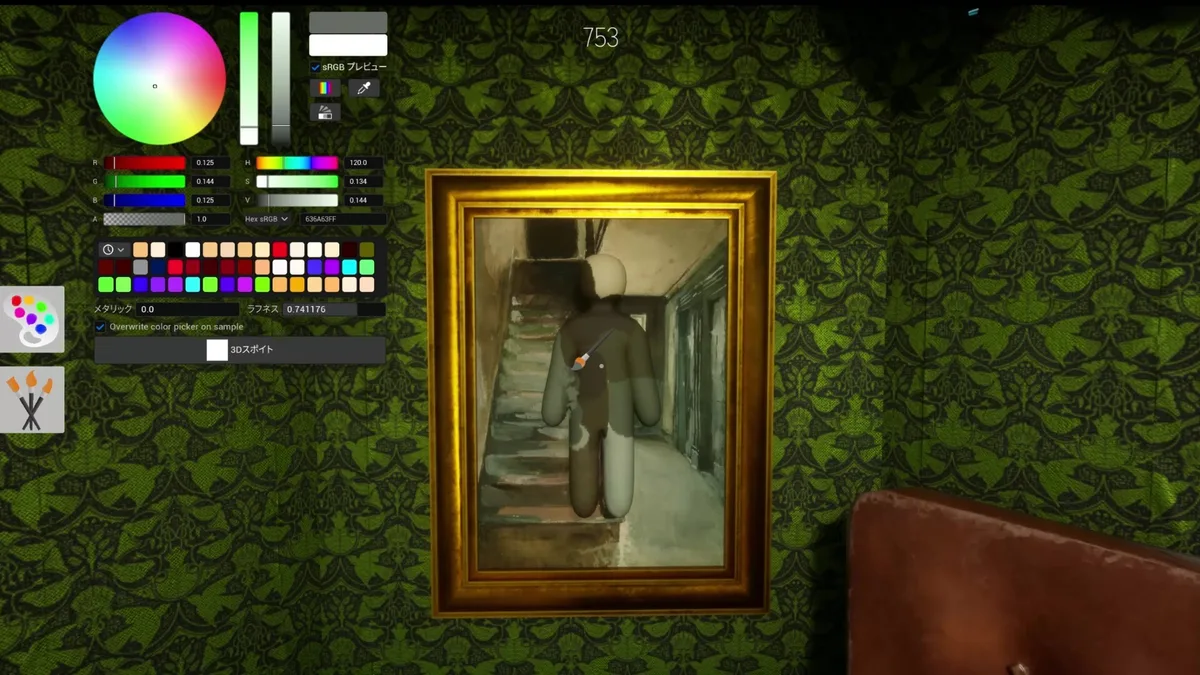
Meccha Chameleon works because the joke is visible instantly. Hiders paint themselves to match walls, floors, props, or odd corners. Then they pose and hope the seeker reads them as part of the map. Good hiding looks clever. Bad hiding looks ridiculous. Both outcomes make good clips.
The best moments do not need a long tutorial. A player stands in plain sight, somehow survives, and everyone understands the trick. Or a hider spends a minute making a careful disguise, then moves at the worst possible time and gets caught. That makes the game easy to share on YouTube, TikTok, Shorts, and livestreams because viewers can guess along with the seeker.
If you are just starting, think of it less like a combat game and more like a fast social deduction scene. As a hider, your job is to pick a place where your color, outline, shadow, and pose make sense. As a seeker, your job is to notice the one object that feels too symmetrical, too human, or too perfectly placed.
That is also why copies appear quickly. The core idea is easy to explain in one sentence, the videos are easy to imitate, and the phrase Meccha Chameleon game is now used by players who may not know whether they want the Steam title, a browser version, a Roblox remake, a mobile listing, or just “that paint-yourself hide-and-seek game from YouTube.” A good result should help you separate those meanings instead of pushing you toward the nearest play button.
What to Search if You Want Similar Games
If Steam is not the right route for you, search for the kind of play session you actually want rather than only the exact game name.
Use games like meccha chameleon when you want close alternatives. Use prop hunt games when you want object-disguise hide-and-seek. Use hide and seek games when the exact paint mechanic matters less than the chase. Use roblox hide and seek games when you specifically want free Roblox sessions with friends.
Use meccha chameleon steam when you want the official PC release. Use meccha chameleon geforce now when your main problem is device compatibility. Use meccha chameleon workshop when you already own the game and want community maps. Use meccha chameleon mobile only if you are checking whether a native phone version has appeared; do not treat search snippets as confirmation.
That split keeps the decision clean. Search the exact title when you want the official game. Search the genre when you want something similar, cheaper, free, mobile-friendly, or playable with a different friend group.
FAQ
Is Meccha Chameleon a Steam game?
Yes. The official Meccha Chameleon release is on Steam for Windows PC, with lemorion_1224 listed as developer and publisher.
Is Meccha Chameleon on Roblox?
There is no confirmed official Meccha Chameleon Roblox release from the Steam developer. Roblox players may find inspired hide-and-seek games or copies, but those should be treated as separate experiences.
Can I play Meccha Chameleon in browser?
There is no confirmed official free browser version. GeForce NOW support means cloud streaming is available for supported accounts and devices, not that the game is a standalone browser game.
Does GeForce NOW mean Meccha Chameleon is online for free?
No. GeForce NOW is a cloud play route for supported accounts and devices. It does not turn Meccha Chameleon into a free browser game or a separate online copy.
Is there a Meccha Chameleon mobile version?
There is no confirmed official native iOS or Android release from the Steam developer. Same-name app listings should be checked carefully before treating them as the real Steam game.
Who made Meccha Chameleon?
The Steam page lists lemorion_1224 as both developer and publisher. Use that name as one of the checks when a third-party page claims to offer the real game.
Why is Meccha Chameleon popular on YouTube?
The game creates short, funny hide-and-seek moments: hiders paint themselves into a scene, pose as objects, and either fool the seeker or get caught in a very visible mistake.
What is the Meccha Chameleon clone?
Most searches for a Meccha Chameleon clone mean a Roblox, browser, or mobile copy inspired by the Steam game. Inside the Steam game, clone can also refer to a gameplay mechanic, so check the context before following a result.