Game Hub
Space Waves Game Guide
Use short holds and release the control early. Space Waves punishes overcorrection more than slow reaction, so a smooth line through tight corridors beats frantic adjustments.
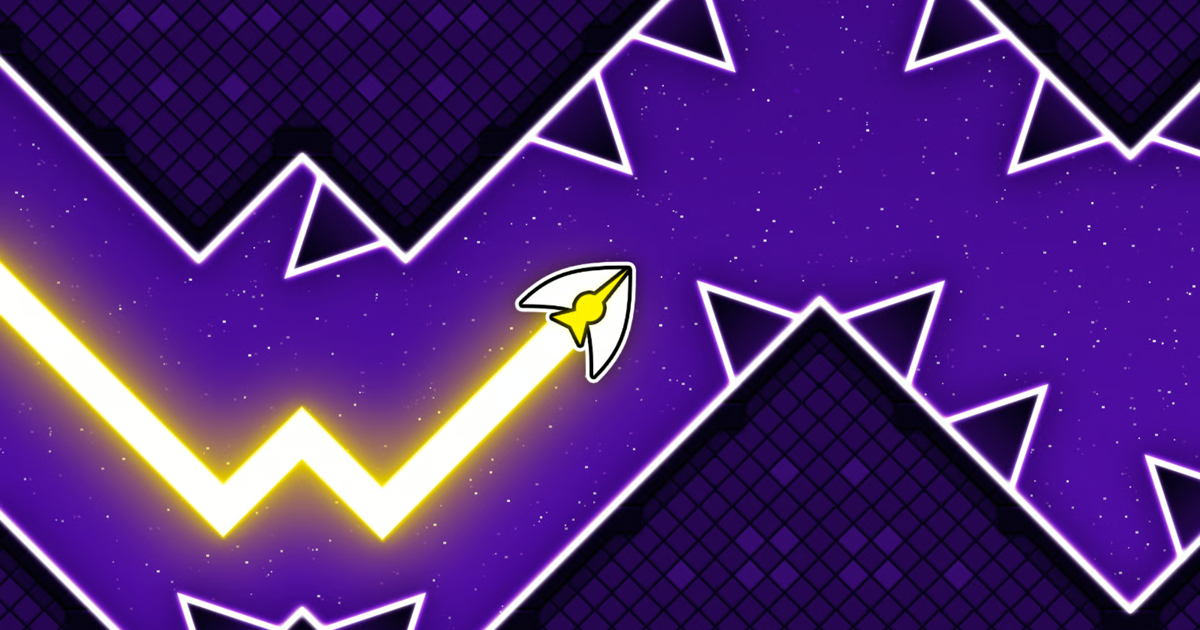
Use short holds and release the control early. Space Waves punishes overcorrection more than slow reaction, so a smooth line through tight corridors beats frantic adjustments.
Current statusGood for current browser-play checks around the December 2025 update, route rhythm, and active-player context. Confirm controls and level behavior in the live game.
Official pageOpen official page
Last updated: May 8, 2026. Reviewed for the current play link, hold/release rhythm, corridor reading, and mobile input feel.
Space Waves is a precision wave-control game where survival depends on small inputs, clean angles, and staying calm through tight corridors. This hub gives players a source check plus practical advice for the first runs.
Quick Answer
Use short holds and early releases. Space Waves punishes overcorrection, so the safest improvement path is to smooth out your wave line before chasing risky gaps.
Quick Facts
| Item | Details |
|---|---|
| Main topic | Space Waves |
| Category | Browser game guide |
| Best player question | where to play, how to control the wave, how to stop overcorrecting |
| Source context | CrazyGames page shows massive vote count and December 2025 update |
What is Space Waves?
Space Waves is a browser-first arcade skill game. The useful reader question is how to control the wave without smashing into walls and which source is safe enough to open.
Open the CrazyGames link below for the browser build, then focus on the control rhythm. The actual skill is not speed; it is keeping the wave smooth when the corridor narrows.
Why is Space Waves getting attention?
Space Waves gets searched because the game looks simple in clips but feels demanding once the corridor narrows. Focus on input rhythm, not just the fact that it is a browser game.
How to Play Space Waves
Open the linked source first, then spend the first run learning how long a hold lifts the wave and how quickly release drops it. Space Waves punishes overcorrection more than hesitation.
A good first session looks like this:
- Use short holds instead of one long climb.
- Release early before the ceiling becomes urgent.
- Watch the next corridor bend, not the current wall.
- Restart with a smoother line, not a faster hand.
- Test mobile only after you know whether tap timing feels predictable.
Controls
Confirm the live prompt on the play page. The key control is usually hold-to-rise and release-to-drop, but desktop and mobile can feel very different.
| Action | Common input |
|---|---|
| Rise | Hold key, mouse, or touch input |
| Drop | Release the input early |
| Restart | End-screen retry or reset prompt |
| Menu | Esc key or menu icon |
| Mobile run | Tap/hold rhythm with screen visibility check |
If your line keeps wobbling, close heavy tabs and try fullscreen. A small input delay makes wave games feel much less predictable.
Tips for Beginners
- Use short holds so you can correct before hitting the ceiling.
- Release earlier than feels natural when the corridor turns downward.
- Watch the next bend instead of staring at the wave.
- Take the wider line even if the tighter gap looks faster.
- Avoid mirror pages that ask for downloads before launch.
Games Like Space Waves
If you like Space Waves, Geometry Arrow has a similar rhythm-control feel, Geometry Arrow 2 adds more mode switching, and Level Devil gives the same short retry loop with trap rooms instead of wave corridors.
Is Space Waves Safe?
Use the linked CrazyGames page or another reputable portal that launches the wave run directly. Skip pages that ask for extensions, downloads, gambling prompts, or unrelated accounts first.
What to Check Before You Play
Use this mini-checklist before spending time on Space Waves:
| Check | Why it matters |
|---|---|
| Official source | Avoids clone pages and fake play buttons |
| Hold timing | The main skill is rise/drop rhythm |
| Corridor visibility | You need to see the next bend early |
| Mobile layout | Touch input can hide the lower corridor |
| Similar rhythm games | Helps you choose another precision route |
Common Mistakes
Beginners usually hold too long, panic-release too late, then overcorrect into the opposite wall. Make smaller inputs and use each crash to learn where the corridor changes direction.
Update Notes
If you revisit after an update, check hold response, mobile touch feel, corridor visibility, and restart timing. Those details decide whether your old rhythm still works.
FAQ
Can I play Space Waves in a browser?
Open the CrazyGames listing linked below, then test hold and release timing before chasing tighter corridors.
What should I look for first?
Start with the safe source, hold/release feel, corridor visibility, mobile support, and restart speed.
Related Guides
| Guide | Why it helps |
|---|---|
| Geometry Arrow | Similar wave-control rhythm |
| Geometry Arrow 2 | Mode-switching precision |
| Level Devil | Short retry skill pressure |
Sources
Bottom Line
Space Waves is strongest when approached as rhythm practice: keep inputs small, learn the corridor shape, and avoid unsafe mirror pages that distract from the actual game.
FAQ
Where can I play Space Waves?
The CrazyGames listing linked on this page is the safest option. Avoid mirror pages that ask for extensions or downloads before launching the game.
Is Space Waves free?
Space Waves is free on CrazyGames. Confirm device support and ad format on the source page before starting.
How does Space Waves control on mobile?
Mobile play uses tap or hold to control the wave. The input feel differs from desktop keyboard or mouse, so spend the first run learning the mobile response before chasing a high score.
What makes Space Waves hard?
The difficulty comes from narrow corridors that penalize small overcorrections. The wave moves continuously, so you cannot stop to realign — you need to anticipate the next gap, not react to the current one.